# Viết chứng từ khấu trừ thuế TNCN

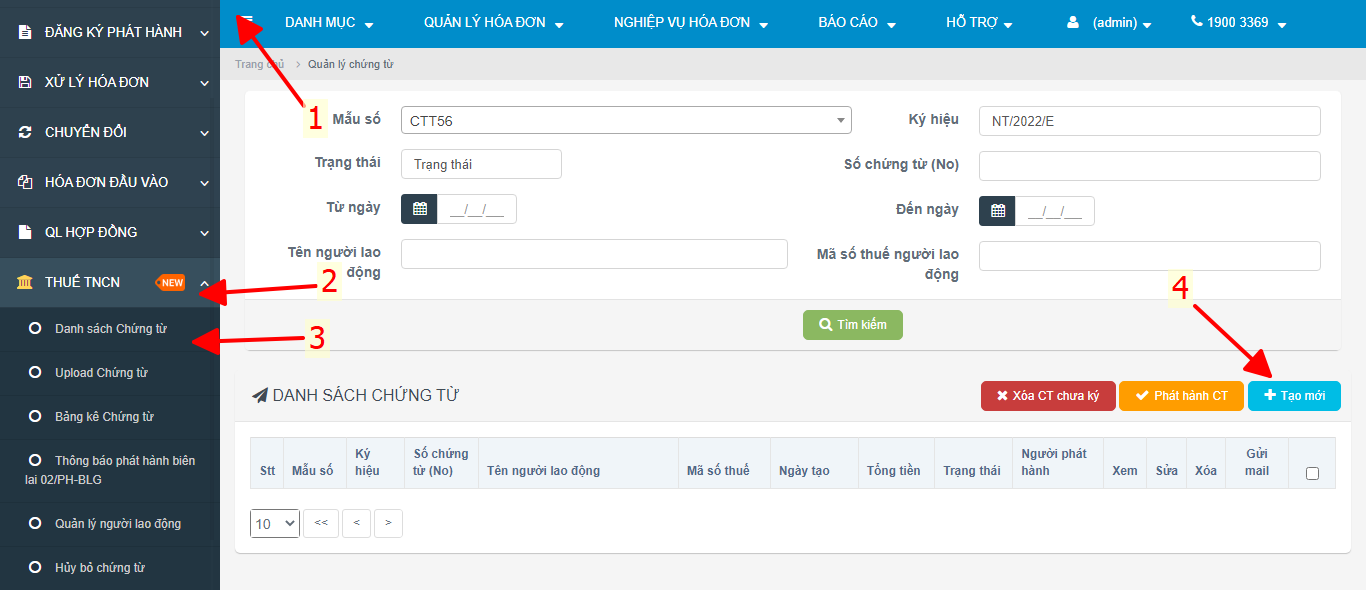
**Bước 1: Menu Thuế TNCN**

<figure><img src="https://2582414113-files.gitbook.io/~/files/v0/b/gitbook-x-prod.appspot.com/o/spaces%2F9Cf5Y4kybg88JAWwlOqb%2Fuploads%2FUVS56GUS3hnp9wxYSwTg%2Fimage.png?alt=media&#x26;token=5c50585e-8ffe-43d5-9249-7cbc60d59c18" alt=""><figcaption><p>Vào giao diện xuất chứng từ khấu trừ thuế TNCN</p></figcaption></figure>

**Bước 2: Nhập thông tin của nhân viên cần xuất.**

<figure><img src="https://2582414113-files.gitbook.io/~/files/v0/b/gitbook-x-prod.appspot.com/o/spaces%2F9Cf5Y4kybg88JAWwlOqb%2Fuploads%2F8GXOmMvUkokmm9YioasI%2Fimage.png?alt=media&#x26;token=adb68676-db98-40e1-856f-dc3799b3208b" alt=""><figcaption><p>Nhập thông tin và lưu dữ liệu</p></figcaption></figure>

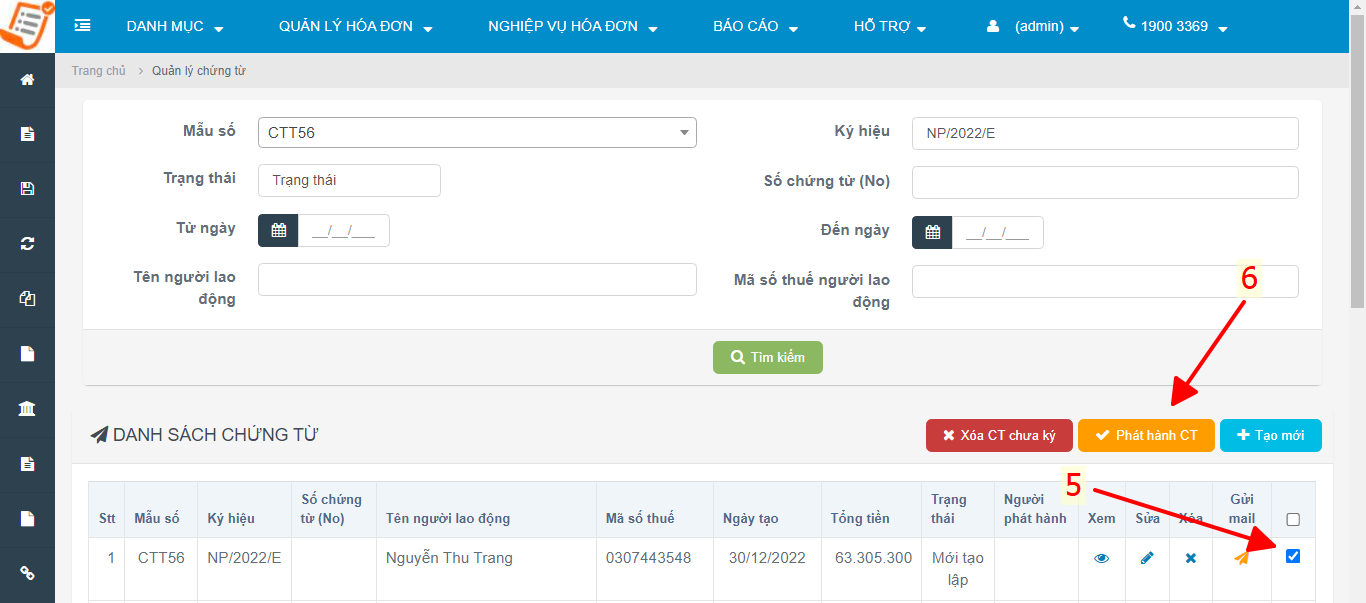
**Bước 3: Chọn chứng từ cần phát hành và ký số**

<figure><img src="https://2582414113-files.gitbook.io/~/files/v0/b/gitbook-x-prod.appspot.com/o/spaces%2F9Cf5Y4kybg88JAWwlOqb%2Fuploads%2Fnh1BabCNUFQVsgHaJXce%2Fimage.png?alt=media&#x26;token=c0ead65f-1cd2-4724-8458-79224b460582" alt=""><figcaption><p>Chọn chứng từ và ấn ký phát hành</p></figcaption></figure>

{% hint style="success" %}
Quý khách hàng có thể ấn quan tâm và chat trực tiếp [Zalo Official <img src="https://2582414113-files.gitbook.io/~/files/v0/b/gitbook-x-prod.appspot.com/o/spaces%2F9Cf5Y4kybg88JAWwlOqb%2Fuploads%2FwE6ZFCyIzmHBgiDbEwmO%2FZalo%20official%20easyinvoice.png?alt=media&#x26;token=60581752-ad10-4536-98cd-cbde3021a3a6" alt="" data-size="line"> tại đây](https://zalo.me/3807068344789440654) hoặc gọi <mark style="color:red;">**0868.210.166**</mark> để được hỗ trợ nhanh nhất !
{% endhint %}